
Go-time
附件文档全文(time )#
time包详解
你希望我详细讲解 Go 语言中 time 包的核心功能、核心概念,并全面列举常用方法,帮助你系统掌握这个包的使用。
在学习方法前,先理解几个基础概念,这是使用 time 包的前提:
- Time 类型:表示一个具体的时间点(包含年月日时分秒纳秒+时区),是 time 包的核心类型。
- Duration 类型:表示时间间隔(纳秒为单位),本质是 int64,常用单位:ns(纳秒)、µs(微秒)、ms(毫秒)、s(秒)、m(分)、h(小时)。
- Location 类型:表示时区(如 UTC、北京时间 CST/Asia/Shanghai),默认使用本地时区或 UTC。
- Ticker:周期性触发时间事件的定时器。
- Timer:一次性触发时间事件的定时器。
以下按功能分类,全面列举常用方法,并附示例和说明,所有代码均可直接运行。
函数/方法 | 签名 | 功能说明 | 示例 |
time.Now() | func Now() Time | 获取当前本地时间 | t := time.Now() |
time.Date() | func Date(year int, month Month, day, hour, min, sec, nsec int, loc *Location) Time | 手动创建指定时间 | t := time.Date(2024, time.March, 15, 10, 30, 0, 0, time.Local) |
time.Parse() | func Parse(layout, value string) (Time, error) | 按指定格式解析字符串为 Time | t, _ := time.Parse("2006-01-02 15:04:05", "2024-03-15 10:30:00") |
time.ParseInLocation() | func ParseInLocation(layout, value string, loc *Location) (Time, error) | 带时区解析字符串 | loc, _ := time.LoadLocation("Asia/Shanghai")<br>t, _ := time.ParseInLocation("2006-01-02", "2024-03-15", loc) |
time.Unix() | func Unix(sec int64, nsec int64) Time | 从时间戳(秒+纳秒)创建 Time | t := time.Unix(1710570600, 0) // 对应2024-03-15 10:30:00 |
time.UnixMilli() | func UnixMilli(msec int64) Time | 从毫秒时间戳创建 Time | t := time.UnixMilli(1710570600000) |
time.UnixMicro() | func UnixMicro(usec int64) Time | 从微秒时间戳创建 Time | t := time.UnixMicro(1710570600000000) |
关键说明:
- Parse 的 layout 固定使用 Go 的诞生时间 2006-01-02 15:04:05(记忆口诀:6 1 2 3 4 5),不能自定义其他数字。
- time.Local 表示本地时区,time.UTC 表示 UTC 时区,time.LoadLocation("Asia/Shanghai") 可加载指定时区(需确保系统时区数据库存在)。
方法 | 签名 | 功能说明 | 示例 |
Year() | func (t Time) Year() int | 获取年 | year := t.Year() |
Month() | func (t Time) Month() Month | 获取月(返回 Month 类型,可转 int) | month := t.Month() // 或 int(t.Month()) |
Day() | func (t Time) Day() int | 获取日 | day := t.Day() |
Hour() | func (t Time) Hour() int | 获取小时 | hour := t.Hour() |
Minute() | func (t Time) Minute() int | 获取分钟 | min := t.Minute() |
Second() | func (t Time) Second() int | 获取秒 | sec := t.Second() |
Nanosecond() | func (t Time) Nanosecond() int | 获取纳秒 | nsec := t.Nanosecond() |
Weekday() | func (t Time) Weekday() Weekday | 获取星期(返回 Weekday 类型) | weekday := t.Weekday() // 如 time.Monday |
YearDay() | func (t Time) YearDay() int | 获取一年中的第几天 | yday := t.YearDay() |
Location() | func (t Time) Location() *Location | 获取时区 | loc := t.Location() |
方法 | 签名 | 功能说明 | 示例 |
Format() | func (t Time) Format(layout string) string | 格式化时间为字符串 | str := t.Format("2006-01-02 15:04:05") |
Unix() | func (t Time) Unix() int64 | 转换为秒级时间戳 | ts := t.Unix() |
UnixMilli() | func (t Time) UnixMilli() int64 | 转换为毫秒时间戳 | ts := t.UnixMilli() |
UnixMicro() | func (t Time) UnixMicro() int64 | 转换为微秒时间戳 | ts := t.UnixMicro() |
UnixNano() | func (t Time) UnixNano() int64 | 转换为纳秒时间戳 | ts := t.UnixNano() |
In() | func (t Time) In(loc *Location) Time | 转换为指定时区的时间 | loc, _ := time.LoadLocation("UTC")<br>tUTC := t.In(loc) |
Local() | func (t Time) Local() Time | 转换为本地时区 | tLocal := t.Local() |
UTC() | func (t Time) UTC() Time | 转换为 UTC 时区 | tUTC := t.UTC() |
String() | func (t Time) String() string | 默认字符串格式 | fmt.Println(t) // 等价于 t.String() |
示例:
Go |
函数/方法 | 签名 | 功能说明 | 示例 |
time.Duration() | func Duration(d int64) Duration | 手动创建 Duration | d := time.Duration(5) * time.Second |
time.ParseDuration() | func ParseDuration(s string) (Duration, error) | 解析字符串为 Duration | d, _ := time.ParseDuration("2h30m10s") |
t.Add() | func (t Time) Add(d Duration) Time | 时间加间隔 | t2 := t.Add(1 * time.Hour) // 加1小时 |
t.AddDate() | func (t Time) AddDate(years, months, days int) Time | 按年月日加间隔 | t2 := t.AddDate(1, 2, 3) // 加1年2月3天 |
t.Sub() | func (t Time) Sub(u Time) Duration | 计算两个时间的间隔 | d := t.Sub(t2) // t - t2 |
t.Before() | func (t Time) Before(u Time) bool | 判断 t 是否在 u 之前 | if t.Before(t2) { ... } |
t.After() | func (t Time) After(u Time) bool | 判断 t 是否在 u 之后 | if t.After(t2) { ... } |
t.Equal() | func (t Time) Equal(u Time) bool | 判断两个时间是否相等(比 == 更安全,处理时区) | if t.Equal(t2) { ... } |
d.Hours() | func (d Duration) Hours() float64 | 转换为小时(浮点) | h := d.Hours() |
d.Minutes() | func (d Duration) Minutes() float64 | 转换为分钟(浮点) | m := d.Minutes() |
d.Seconds() | func (d Duration) Seconds() float64 | 转换为秒(浮点) | s := d.Seconds() |
d.Milliseconds() | func (d Duration) Milliseconds() int64 | 转换为毫秒(整数) | ms := d.Milliseconds() |
d.Microseconds() | func (d Duration) Microseconds() int64 | 转换为微秒(整数) | us := d.Microseconds() |
d.Nanoseconds() | func (d Duration) Nanoseconds() int64 | 转换为纳秒(整数) | ns := d.Nanoseconds() |
关键说明:
- Duration 支持的单位常量:time.Nanosecond、time.Microsecond、time.Millisecond、time.Second、time.Minute、time.Hour。
- AddDate 是按「日历」加减(如1月31日加1个月是2月28/29日),而 Add 是按绝对时间加减。
- 比较时间优先用 Before/After/Equal,而非直接 ==(避免时区导致的判断错误)。
函数/方法 | 签名 | 功能说明 | 示例 |
time.NewTimer() | func NewTimer(d Duration) *Timer | 创建一次性定时器 | timer := time.NewTimer(2 * time.Second)<br><-timer.C // 等待2秒 |
timer.Stop() | func (t *Timer) Stop() bool | 停止定时器 | timer.Stop() |
timer.Reset() | func (t *Timer) Reset(d Duration) bool | 重置定时器 | timer.Reset(1 * time.Second) |
time.After() | func After(d Duration) <-chan Time | 简化版 Timer(返回通道) | <-time.After(2 * time.Second) // 等待2秒 |
time.NewTicker() | func NewTicker(d Duration) *Ticker | 创建周期性定时器 | ticker := time.NewTicker(1 * time.Second)<br>go func() {<br> for range ticker.C {<br> fmt.Println("tick")<br> }<br>}()<br>time.Sleep(5 * time.Second)<br>ticker.Stop() |
ticker.Stop() | func (t *Ticker) Stop() | 停止周期性定时器 | ticker.Stop() |
time.Sleep() | func Sleep(d Duration) | 让当前 goroutine 休眠 | time.Sleep(2 * time.Second) |
关键说明:
- time.After() 是便捷方法,但如果不需要等待结果,直接用会造成 goroutine 泄漏(需配合 timer.Stop())。
- Ticker 停止后,通道不会立即关闭,需手动处理退出逻辑。
函数 | 签名 | 功能说明 | 示例 |
time.Since() | func Since(t Time) Duration | 计算从 t 到现在的间隔(等价于 Now().Sub(t)) | d := time.Since(t) |
time.Until() | func Until(t Time) Duration | 计算从现在到 t 的间隔(等价于 t.Sub(Now())) | d := time.Until(t) |
time.LoadLocation() | func LoadLocation(name string) (*Location, error) | 加载指定时区 | loc, err := time.LoadLocation("Asia/Shanghai") |
time.FixedZone() | func FixedZone(name string, offset int) *Location | 创建固定偏移的时区 | loc := time.FixedZone("CST", 8*3600) // 东八区 |
Go |
Go |
Go |
- 时区问题:默认时间操作会使用本地时区,跨时区处理需显式指定 Location。
- 时间戳精度:Unix() 返回秒级,UnixMilli()/UnixMicro()/UnixNano() 分别返回毫秒/微秒/纳秒级,根据业务需求选择。
- 定时器泄漏:使用 time.After() 时,如果不需要等待结果,必须通过 NewTimer 创建并手动 Stop(),避免 goroutine 泄漏。
- 格式字符串:Parse/Format 的 layout 必须使用 2006-01-02 15:04:05,不能替换为其他数字(如 2024-03-15)。
以上是 time 包的核心内容和常用方法,覆盖了日常开发中99%的使用场景。如果有具体的使用场景(如时间比较、时区转换、定时任务)需要深入讲解,可以告诉我。
|(注:文档部分内容可能由 AI 生成)
附件原文:onenote-go-time-time_.docx(点击下载)
转换文字版(供搜索 / 复制)
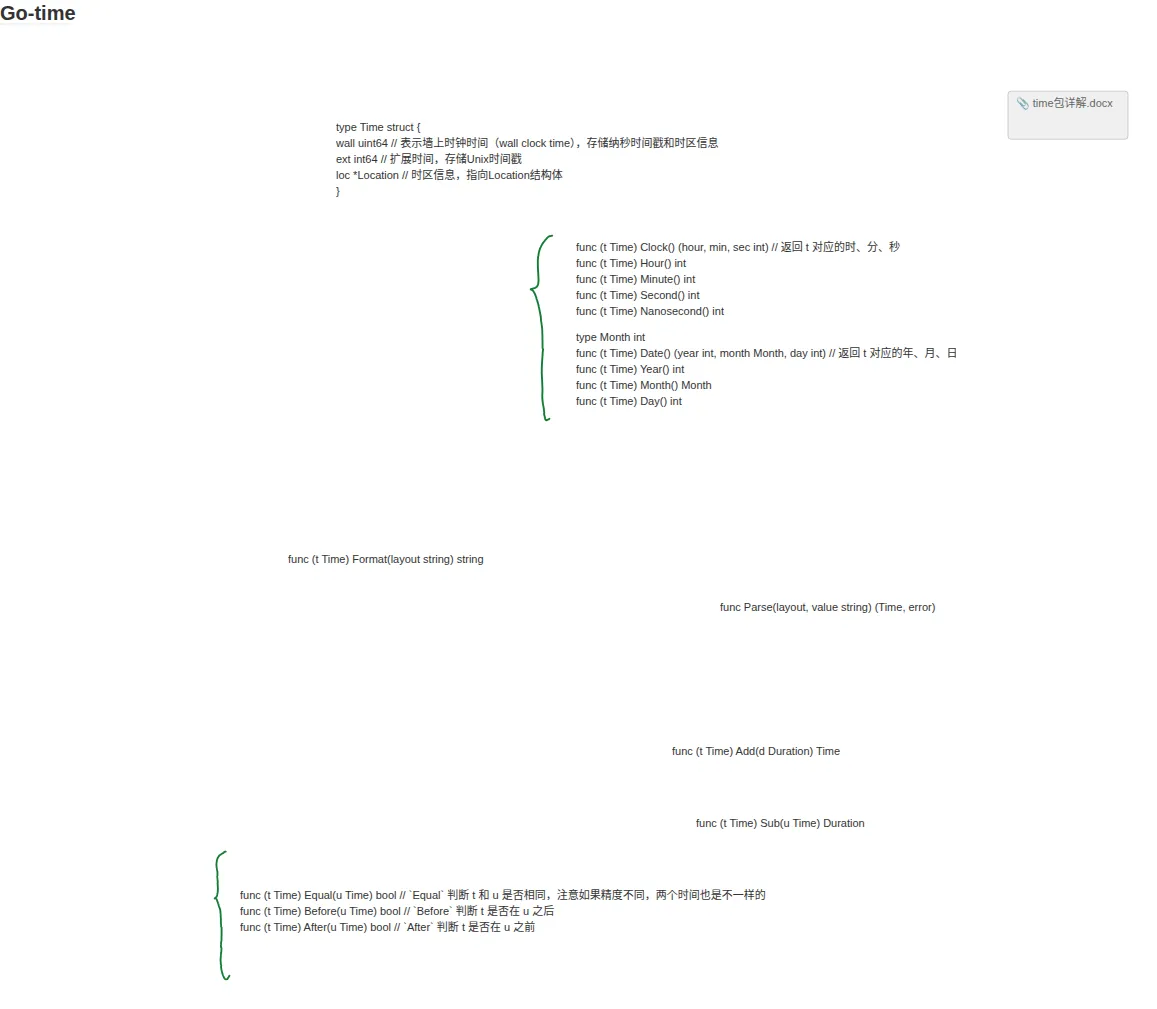
type Time struct {
wall uint64 // 表示墙上时钟时间(wall clock time),存储纳秒时间戳和时区信息
ext int64 // 扩展时间,存储Unix时间戳
loc *Location // 时区信息,指向Location结构体
}
func (t Time) Clock() (hour, min, sec int) // 返回 t 对应的时、分、秒
func (t Time) Hour() int
func (t Time) Minute() int
func (t Time) Second() int
func (t Time) Nanosecond() int
type Month int
func (t Time) Date() (year int, month Month, day int) // 返回 t 对应的年、月、日
func (t Time) Year() int
func (t Time) Month() Month
func (t Time) Day() int
func (t Time) Format(layout string) string
func Parse(layout, value string) (Time, error)
func (t Time) Add(d Duration) Time
func (t Time) Sub(u Time) Duration
func (t Time) Equal(u Time) bool // `Equal` 判断 t 和 u 是否相同,注意如果精度不同,两个时间也是不一样的
func (t Time) Before(u Time) bool // `Before` 判断 t 是否在 u 之后
func (t Time) After(u Time) bool // `After` 判断 t 是否在 u 之前